Because Pinterest research usually involves a fair bit of detective work. You’re searching keywords, checking Pinterest Trends, looking at Pins, trying to spot what’s gaining interest and generally attempting to figure out what people actually want before you spend your time creating content for them.
Pin Inspector is designed to make that research a hell of a lot faster.
📈 Pinterest Trends Are Useful. Digging Through Them Manually? Less Fun.
If you’re using Pinterest for your business, knowing what people are searching for can give you a much better starting point than simply creating whatever pops into your head that morning.
You might have a broad topic you want to create around — digital products, side hustles, Instagram marketing, home organisation, recipes, whatever fits your niche — but there are still questions.
What are people interested in right now? Is interest in this topic growing? What related searches should I be looking at? Is there a more specific angle hiding inside my broad keyword?
You can absolutely research those things manually.
The problem is that once you start researching multiple keywords and comparing different ideas, your “quick Pinterest research session” can become a rather impressive collection of tabs. 😂
And that’s where Pin Inspector’s Top Trends tool gets interesting.
🔍 So, What Does the Trends Tool Actually Do?
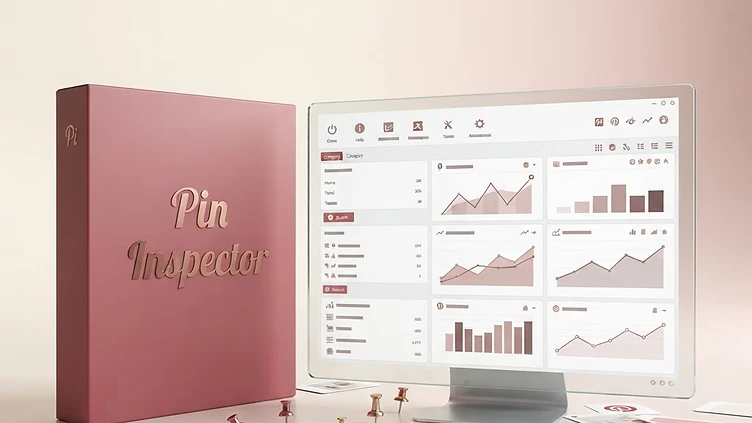
Pin Inspector says its Trends tool can extract the latest trending searches directly from Pinterest’s Trends section and display them inside the software.
But it doesn’t stop at showing you a list of trending phrases.
For the trending search phrases it extracts, Pin Inspector can also show a full year of search-volume index data, giving you a way to look at how interest has moved over time rather than only seeing a keyword in isolation.
You can also enter your own keyword and use the trends extraction engine to generate related trending search phrases. If you already have a list of keywords you want to investigate, you can import those too and extract trend data or related trending phrases around them.
So instead of sitting there wondering:
“Do people actually care about this topic?”
…you can go looking for the data before you create the content.
And THAT is the shortcut I’m interested in.
👀 Imagine Doing the Research Before Making the Pin
This sounds ridiculously obvious when you say it out loud, but a lot of us create content backwards.
We think of an idea. Spend time designing it. Write the title and description. Publish it.
Then we wait to see whether anyone actually wanted it.
Pinterest research gives you an opportunity to flip that process around.
Start with a broad idea, investigate what’s happening around it, look for relevant search behaviour and then decide which content makes sense to create.
Pin Inspector’s own suggested workflow takes this further: pull the latest trending search phrases, sort the data to see what is currently spiking, then send a promising phrase over to its Pin Analyzer to investigate the Pins around that search.
Now you’re not just asking:
“What’s trending?”
You can start asking:
“What content is already performing around this trend?”
That’s a much more useful rabbit hole. 👀
📌 Because a Trend Alone Doesn’t Tell You What to Create
Finding an interesting search phrase is one thing.
Knowing what to do with it is another.
Let’s say you uncover a topic that looks interesting for your niche. The next thing I’d want to know is what’s already happening around that search.
What kinds of Pins are appearing? Which angles seem to be getting engagement? What titles are being used? Are there patterns in the content? Could I approach the same topic from a different or more specific angle for my own audience?
This is where Pin Inspector becomes more than just a Trends tool.
Its current software includes eight research tools, covering popular keywords, trends, Pins, boards, Pinners, Pinterest browsing/scraping and additional keyword and annotation research. Its Pins Analyzer can extract dozens of data points from Pinterest content, including information such as saves, repins, reactions, descriptions and other Pin data.
So you can move from:
TREND → KEYWORD → CONTENT RESEARCH → YOUR OWN CONTENT IDEA
instead of finding a trending phrase and having absolutely no bloody clue what to do with it. 😂
💡 This Isn’t About Copying Whatever Is Already Popular
There’s an important distinction here.
Researching successful Pinterest content doesn’t mean finding somebody else’s high-performing Pin and recreating it.
The useful part is spotting patterns and opportunities.
Maybe you notice several Pins around a trending topic are incredibly broad, and you could create something more specific.
Maybe a search phrase gives you an idea for a blog post you hadn’t considered.
Maybe you discover related searches that fit your product much better than the keyword you originally planned to target.
Or maybe the research confirms there’s interest in an idea already sitting on your content list.
The data gives you somewhere to start.
You still have to do the thinking.
😅 And Yes, You Can Do Pinterest Research Without It
You don’t need software to research Pinterest.
Pinterest already has useful information sitting right there on the platform, and you can manually investigate keywords, trends and content yourself.
For me, that’s not really the point.
The question is whether you want to manually gather and compare that information every time you’re researching content — or whether having a tool pull much more of it together would make the process easier.
That’s where Pin Inspector starts making sense, particularly if Pinterest is going to be an ongoing traffic source for your business rather than something you post to twice and forget exists for six months. 😂
🔎 It Goes Way Beyond Trends Too
The Trends feature might be the headline-grabber, but Pin Inspector is really a broader Pinterest research tool.
Alongside trends, its current version includes tools for generating popular keywords from Pinterest autocomplete, analysing Pins, researching boards and Pinners, and browsing Pinterest while extracting additional data.
That means you could use it at several points in your research process: finding keyword ideas, investigating what’s trending, looking more closely at content around those topics and exploring what’s already happening within your niche.
It’s essentially giving you more information to work with before you decide what deserves your time creating.
And when content creation already takes enough bloody time, I’m very much in favour of making the research bit quicker. 😂
📈 The Real Shortcut? Less Guessing.
I’m always suspicious when something promises a marketing “shortcut” that basically translates to:
Press button → internet loves you → money falls from sky.
That’s not what I’d expect from Pin Inspector.
The shortcut here is much more practical.
Instead of manually digging around Pinterest trying to piece together keywords, trends and content ideas, you can use the software to pull a much larger amount of Pinterest research data together and investigate it from there.
You still need to choose the right topics.
You still need to create good content.
You still need to test what works for your Pinterest account and audience.
But you can start with something better than:
“I reckon people might be searching for this.”
And for me, that’s the interesting part.
👀 Want to See What Pinterest Is Already Telling You?
Pin Inspector describes its Trends feature as able to extract current trending searches directly from Pinterest, pull a year of search-volume index data for extracted phrases and research trends around keywords you choose. The company currently claims “there is no other software on the planet that extracts trends data directly from Pinterest.”
I haven’t independently tested every Pinterest research tool on the planet — so I’m leaving that particular crown firmly as their claim. 😂
But if you use Pinterest seriously for traffic, content or product research and you’re tired of doing the detective work manually, this is definitely the feature I’d be having a nosey at.
👉 [CHECK OUT PIN INSPECTOR + WATCH THE DEMO]
Affiliate disclosure: This post contains affiliate links. If you purchase Pin Inspector through my link, I may earn a commission at no extra cost to you.